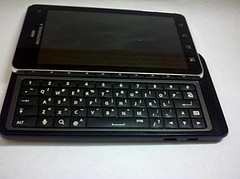

Guru gets ejected from Google+ and buys a Droid 3.
Show Notes
- Droid 2 Global update information removed from Verizon’s website, Guru gives in and buys a Droid 3.
- Platform News
- AT&T announces the Nexus S. Verizon becomes only carrier not to have a Google phone.
- Multiple APK support launched, allows developers to upload multiple APKs for the same application, each targeted for different devices/users.
- Study reports that 8% of Android Apps leak private information.
- 20th Century Fox announces digital downloads of its movies to Android, if you bought the blu-ray.
- New Market rolls out with videos and books.
- App News
- Amazon MP3 app updated. Playlists include Latest Purchases and Uploads.
- Netflix updated with additional app support. (Market Link)
- Dolphin Browser 6.0 released. (Market Link)
- The Economist app released for phones and smaller tablets. (Market Link)
- ComiXology no longer beta. More than 3000 issues available from DC and Vertigo comics. (Market Link)
- Viber now out of private beta. (Market Link) – Simple VoIP app, crossplatform with iOS. Uses push notification to alert to new calls, saving battery.
- Travelocity App launched. (Market Link)
- Google Music Manager now available for Linux. Might be time to reexamine Google Music.
- Lifehacker names Moboplayer the best video player for Android.
- Disney pushes out Winnie the Pooh interactive book app. ($2.99, Market Link)
- Pocket Casts Podcatcher (Market Link)
- Airplane Mode Wi-Fi Tool – allows you to automatically enable wi-fi in airplane mode (Market Link)
- Media Keys – shortcut creator that creates FF/REW/Play/Pause/Next/Previous shortcuts. (Market Link)
- Media Button Router – designed to let you decide which app plays music when bluetooth buttons hit. (Market Link)
- Life 360 – Ultimate Safety App (Market Link)

Podcast: Play in new window | Download (Duration: 48:54 — 22.4MB)